As of December 8, 2023, Wafeq has implemented new methods for calculating VAT and subtotals to align with recent regulations from local tax authorities.
New Calculation Method
The updated calculation method in Wafeq is as follows:
- Line Amount Excluding Tax: Calculated as
Quantity x Price before tax x (1 - Discount %)rounded to two decimals. - Taxable Amount Per Tax Group: Sum of Line Amounts Excluding Tax for each tax group, minus any document-level discount for that group.
- Tax Group Tax: Taxable amount for each group multiplied by its tax rate, rounded to two decimals.
- Subtotal: Sum of all Line Amounts Excluding Tax.
- Total Tax: Aggregate of each tax group's tax.
- Total Invoice Amount: Taxable Subtotal plus Total Tax.
Illustrative Example
Consider an invoice with the following details:
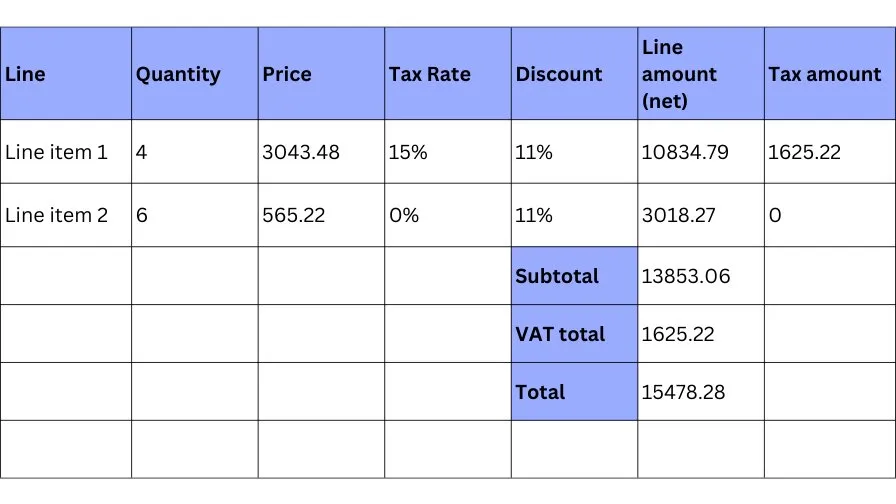
Calculation Steps:
- Taxable Amount per 15% Tax Group =>
10834.79(since it's the only item in this group). - Taxable Amount per 0% Tax Group =>
3018.27. - Taxable Subtotal =>
10834.79 + 3018.27 = 13853.06. - Subtotal => Equal to the Taxable Subtotal
13853.06as there are no document-level discounts. - VAT for 15% Tax Group =>
10834.79 * 15% = 1625.2185, rounded to 1625.22. - VAT for 0% Tax Group =>
3018.27 * 0% = 0. - VAT Total =>
1625.22 + 0 = 1625.22. - Total Invoice Amount =>
13853.06 + 1625.22 = 15478.28Taxable Subtotal + VAT Total
Handling Documents Created Before December 8, 2023
For documents created before this date, the old VAT calculation method will remain in effect. To apply the new rules to an older document, duplicate it. This process applies the new rules to the copy, allowing you to delete the original.
Comments
0 comments
Please sign in to leave a comment.